The Ultimate Pose Estimation Breakthrough | 5 Ways YOLO AI Decodes Your Every Move
Pose Estimation is one of the most fascinating capabilities in modern computer vision. It goes beyond simply detecting “a person” in an image—it allows AI to locate key human joints and reconstruct a “skeleton” representing body movements. By analyzing these keypoints, AI can understand what a person is doing, how they move, and even assess whether a motion is performed correctly.
This technology is already embedded in everyday applications: fitness apps that correct posture, sports motion analysis, fall detection in elderly care, and motion-controlled games all rely on Pose Estimation.
With the rapid advancement of deep learning, particularly high-speed and accurate models like YOLO, the accuracy and usability of pose estimation have significantly improved. This article will uncover how AI understands human motion and demonstrate a practical example using YOLO.

Contents
What Is Pose Estimation?
Pose Estimation is a computer vision technique aimed at identifying and localizing keypoints of humans or objects to infer their pose in 2D images or 3D space.
The basis of pose estimation is detecting and connecting keypoints—points on a body or object with clear semantic meaning.
For humans: Keypoints typically correspond to joints, such as wrists, elbows, shoulders, knees, ankles, hips, and head. A simple model may use 17 keypoints, while more complex models may use dozens.
For objects: Keypoints could represent corners or meaningful parts, like the four legs and top of a chair.
Pose Estimation is the core technology for AI to understand human motion. Coupled with real-time models like YOLO, it can detect actions quickly and accurately, unlocking numerous smart applications.
Core Mechanism
When YOLO performs pose estimation, it not only detects human locations but also performs multi-level analysis to understand movement. Here are five key steps:
- Real-Time Human Localization
YOLO uses a high-speed CNN to detect every person in the frame and generate accurate bounding boxes for skeleton analysis. - High-Accuracy Keypoint Detection
YOLO Pose models detect 17 human keypoints (head, shoulders, elbows, knees, etc.), forming the foundation for skeleton reconstruction. - Skeleton Reconstruction
Detected keypoints are connected according to human anatomy, forming a skeleton that represents pose, orientation, and angles. - Pose Interpretation & Angle Analysis
YOLO can infer whether a person is squatting, jumping, bending, or stretching, and assess motion correctness (e.g., knee alignment during a squat). - Multi-Person Motion Tracking
YOLO combined with trackers like ByteTrack can maintain IDs in multi-person scenarios and analyze each person’s continuous motion.
Applications: Fitness and gait analysis, motion-controlled games, virtual character animation, fall detection, behavior recognition, and gesture analysis.
Development Environment
We will use Ultralytics YOLO for pose estimation. Ultralytics provides an official Python package and CLI, making installation and environment setup straightforward.
System Requirements:
| Component | Recommended |
|---|---|
| OS | Windows / macOS / Linux |
| Python | ≥ 3.8 |
| GPU | NVIDIA GPU with CUDA 11+ (for acceleration) |
| Framework | PyTorch (auto-installed) |
Setting Up a Virtual Environment
Creating a virtual environment helps keep your workspace clean and avoids dependency conflicts:
python -m venv yoloenvActivate the environment:
# macOS / Linux
source yoloenv/bin/activate

# Windows
yoloenv\Scripts\activate
Once you see (yoloenv) in your terminal prompt, the environment is active.
Installing YOLO
Install the official Ultralytics package, which includes the YOLO model and CLI tools::
pip install ultralyticsVerify your installation:
yolo versionIf you see a version number like 8.3.x, the installation was successful — YOLO11 is included in this release branch.
Code
This Python script detects human keypoints and draws skeletons:
# ===============================
# YOLO Pose Complete Python Example
# ===============================

import os
from ultralytics import YOLO

# Set up project folder
project_dir = "/Users/kdm4/Desktop/yoloenv/main/pose_outputs"  # Customize the save folder
os.makedirs(project_dir, exist_ok=True)

# Load YOLO Pose model
# yolo11n-pose.pt = Nano version, lightweight and fast for demo purposes
model = YOLO("yolo11n-pose.pt")

# Test image (Ultralytics official sample image)
image_source = "https://ultralytics.com/images/bus.jpg"

# Run pose inference
results = model(
    image_source,
    save=True,           # Automatically save the output
    project=project_dir, # Specify the save directory
    name="pose_demo",    # Subfolder name
)

# Display results (opens a window with the image)
results[0].show()

# Print detected keypoints
print("\nDetected keypoints:")
for i, kp in enumerate(results[0].keypoints.xy):
    print(f"Person {i+1}:")
    print(kp)  # Each keypoint's (x, y) coordinates

# Show save directory
print(f"\nResults saved to: {results[0].save_dir}")
Code Explanation
- Modules: Load
osfor folders, and YOLO for pose estimation. - Output Folder: Create a folder for saving results.
- Load YOLO Pose Model: Using lightweight
yolo11n-pose.pt. - Input Image: Supports local path or online image.
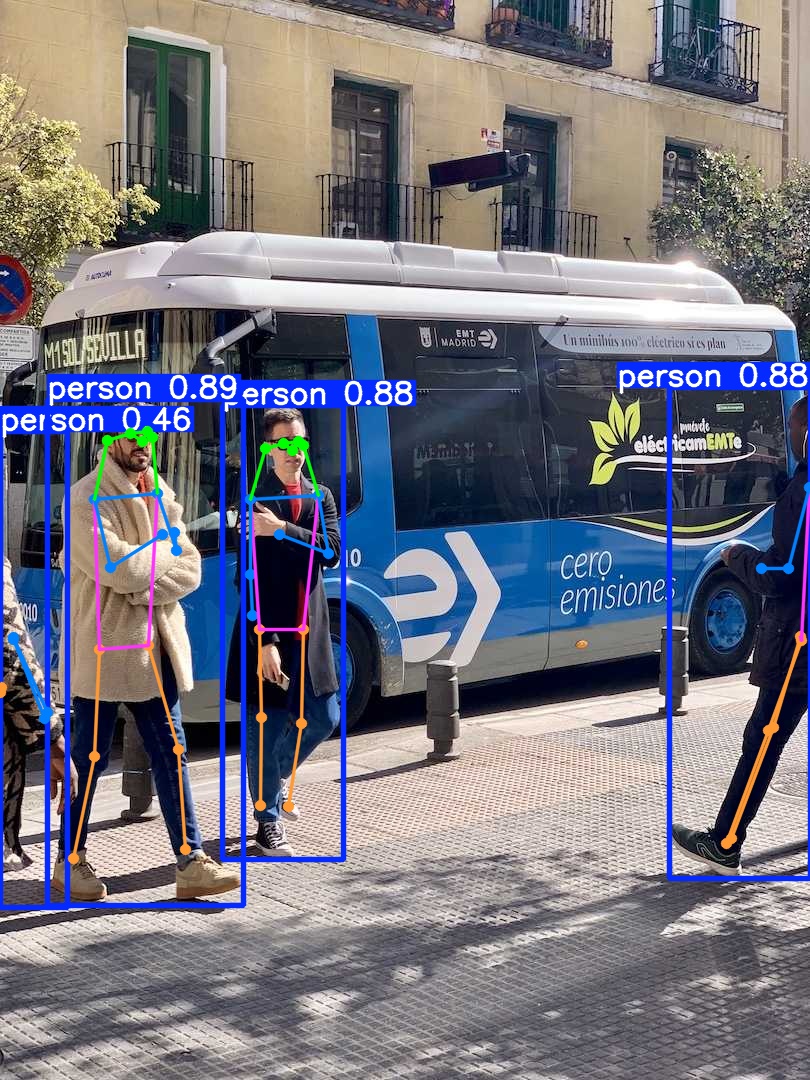
- Pose Estimation: Detects humans, identifies 17 keypoints, draws skeletons, and saves results.
- Display Results: Opens a window showing detected skeletons.
- Output Keypoints: Lists each person’s 17
(x, y)coordinates for further analysis. - Save Location: Confirms where outputs are stored.
Output
Keypoints are printed like:
Person 1:
tensor([[142.36, 441.86],
        [147.98, 431.41],
        ...
        [185.97, 849.75]])
Results are stored in the specified folder, including skeleton images and keypoint data.
Conclusion
Running this Python demo demonstrates YOLO Pose’s power. With a few lines of code, you can detect humans in an image, locate keypoints, and reconstruct a skeleton model.
Logs show model status, number of detected people, and keypoint coordinates, allowing immediate verification of pose estimation.
Saved outputs enable further motion tracking, action recognition, or other analyses. This demo provides a complete, practical workflow for developers to quickly get started with YOLO Pose.
Future Applications:
- Fitness and sports motion analysis
- Fall detection and elderly care
- AR/VR motion games
- AI dance and gesture recognition