In IoT development, the ESP32 is a powerful microcontroller. When combined with C++ template features, the code becomes more efficient, flexible, and reusable. This article will demonstrate how to use C++ templates with the ESP32 IDF to develop a simple sensor project that reads temperature and light data, and uses ESP-IDF's esp_log for logging output.
Content
What is a C++ Template?
C++ templates allow you to write generic functions or classes that can work with multiple data types. By using templates, you can reduce the amount of duplicated code, thereby increasing the reusability of your code. For example, an add function can perform addition on both int and float types without needing to rewrite separate add functions for each type.
Why Use Templates on ESP32?
Compared to computer systems, the ESP32 has limited memory, making code optimization particularly important. Using templates can reduce the duplication of function or class copies, saving memory. Additionally, in IoT projects, templates enhance code readability and modularity, making it easier to handle diverse sensor data.
1. In VS Code, press Ctrl (Cmd) + Shift + P, then type ESP-IDF: New Project.

2. Choose a template project (like the blink example), set the project name (e.g., my_project), and select a storage path.

3. The system will automatically generate a new ESP-IDF project for you, including basic CMake files and sample code.
File Structure
This project will simulate two sensor classes:

TemperatureSensor: Simulates a temperature sensor.

LightSensor: Simulates a light sensor.

We will use C++ templates to create a generic function to read data from these two sensors.
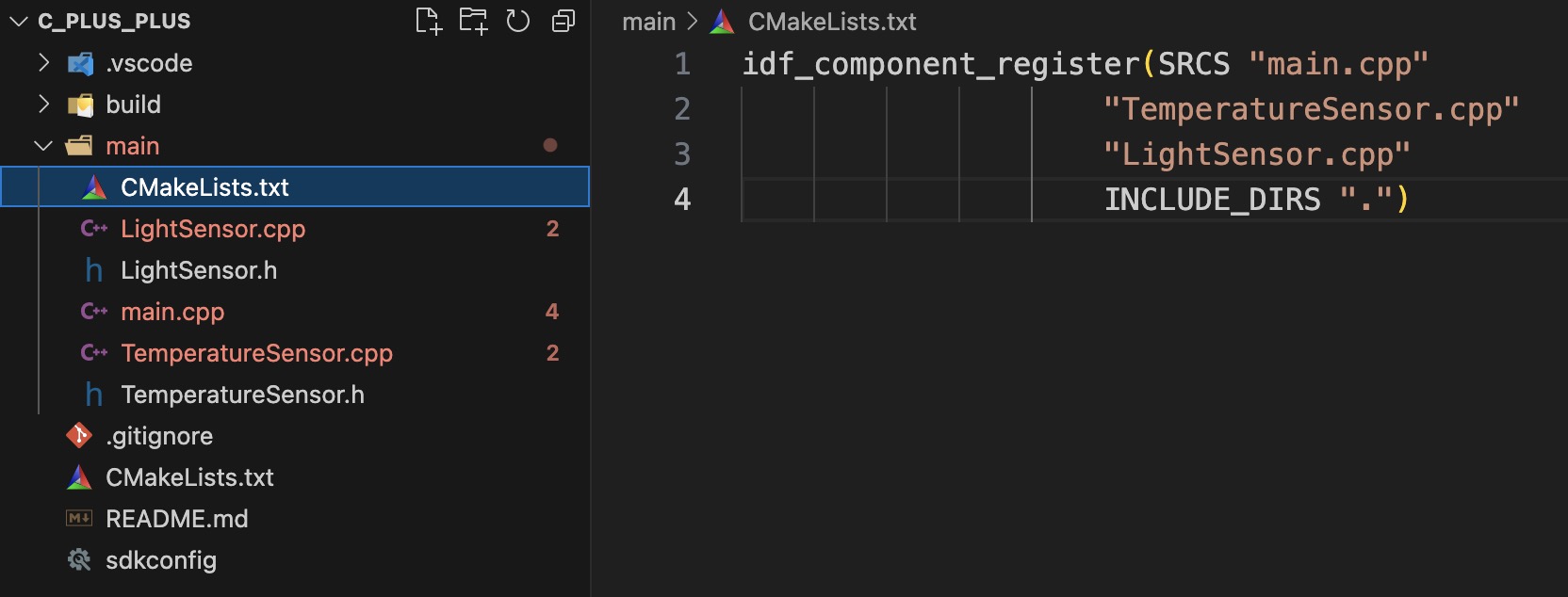
my_project/                   // Project root directory
├── CMakeLists.txt            // CMake configuration file
├── main/                     // Main program directory
│   ├── CMakeLists.txt  // CMakeLists.txt for the main program
│   ├── main.cpp        // Main program entry file (app_main)
│   ├── TemperatureSensor.h     // Definition of the class
│   ├── TemperatureSensor.cpp   // Implementation of the class
│   ├── LightSensor.h           // Definition of the class
│   └── LightSensor.cpp         // Implementation of the class
└── sdkconfig                   // ESP-IDF configuration file
Make sure to include TemperatureSensor.cpp and LightSensor.cpp in the SRCS parameter of idf_component_register in the main CMakeLists.txt to ensure these source files are included during compilation. This way, the compiler can find these files and compile them into the final firmware.
TemperatureSensor Class
The TemperatureSensor class simulates a temperature sensor, providing methods for initialization (begin()) and data reading (readValue()).
#include "TemperatureSensor.h"
#include "esp_log.h"

void TemperatureSensor::begin() {
    ESP_LOGI("TemperatureSensor", "Temperature sensor initialized.");
}

float TemperatureSensor::readValue() {
    // Simulate temperature data, range from 25°C to 35°C
    return 25.0 + (rand() % 100) / 10.0;  // Generate a random temperature value
}
The readValue method of this class returns simulated temperature data, which can be replaced with actual temperature sensing logic in a real application.
LightSensor Class
The LightSensor class simulates a light sensor, offering similar methods as the TemperatureSensor.
#include "LightSensor.h"
#include "esp_log.h"

void LightSensor::begin() {
    ESP_LOGI("LightSensor", "Light sensor initialized.");
}

float LightSensor::readValue() {
    // Simulate light data, range from 200 to 1000
    return 200.0 + (rand() % 800);  // Generate a random light intensity
}
In this class, the readValue method generates simulated light intensity data, which can similarly be replaced with actual sensing logic.
Generic Template Function readSensor
We can use the template function readSensor to read data from either the temperature or light sensor, avoiding the need to write separate code for each sensor class.
Explanation:
Create instances of TemperatureSensor and LightSensor.Use the template function readSensor to read data from each sensor and log the temperature and light data using ESP_LOGI.Use vTaskDelay to set a delay, reading data every second.
Compilation and Flashing
At the bottom of the VS Code window, find the "ESP32-IDF: Build, Flash and Monitor" icon to execute and flash the program.
Results
After running the program, you will see the following output in the terminal:
I (1234) I (10) TemperatureSensor: Temperature sensor initialized.
I (10) LightSensor: Light sensor initialized.
I (1010) SensorApp: Temperature: 26.3 °C
I (1010) SensorApp: Light Level: 458.0 lux
I (2010) SensorApp: Temperature: 29.1 °C
I (2010) SensorApp: Light Level: 712.0 lux
I (3010) SensorApp: Temperature: 25.7 °C
I (3010) SensorApp: Light Level: 325.0 lux
I (4010) SensorApp: Temperature: 31.2 °C
I (4010) SensorApp: Light Level: 567.0 lux
Conclusion
This example demonstrates how to utilize the features of C++ templates in an ESP32 project to implement a generic sensor reading function, making the code more flexible and modular. With templates, we can easily expand support for new sensors by simply writing new classes and calling them with the template function. This structure effectively enhances code reusability and reduces development complexity, making it a valuable technique in IoT development.

I hope this article helps you better understand the application of C++ templates in ESP32 development!